

Start Here
Credits & Billing
Grafilab runs on prepaid credits: one wallet, how to fill it, where the spend shows up, and what happens when it runs out.
How credits work
Section titled “How credits work”You have one wallet, created at signup, its currency stamped from the country on your profile and never changed afterwards. One credit is one unit of that currency. The same balance pays for a GPU rental and for a chat completion — “Credits can be applied across all products.” Credits do not expire, and any free or promotional credits are spent before your paid balance.
Your currency also decides which models you can call: a model with no price in your currency is hidden from the catalog, and calling it by id returns 404 model_not_found. If a model is missing from GET /v1/models, that is usually why.
Without a country on your profile there is no wallet and no currency, and both top-ups and inference calls are refused. Set it under My Settings if you skipped it.
Add funds
Section titled “Add funds”-
Click Buy Credit in the console header, from any page. Add Funds on the Available Credits card at Billing opens the same dialog.
-
Stay on the Buy tab of the Top Up dialog. Under “Enter the credit amount for topup”, type the amount. The field takes whole numbers only and shows a
$prefix; the charge is made in your wallet’s currency. There are no preset amounts. -
Click Buy. Grafilab hands you to the card checkout, where you enter your payment details. Any sales tax that applies to your country is added there rather than to the amount you typed.
-
After the payment clears you land on a page that reads “Your Payment is Successful”. The header balance updates once the payment has been confirmed.
Redeem a voucher
Section titled “Redeem a voucher”The voucher form is one click from the Buy tab.
-
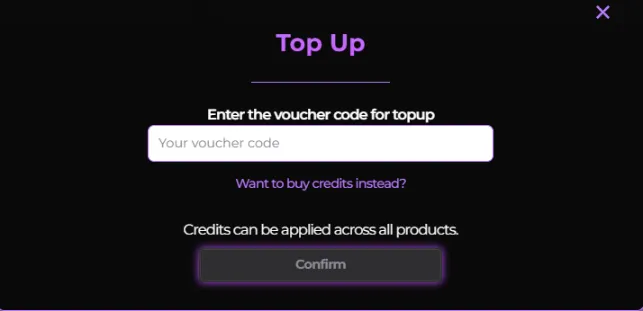
Open the Top Up dialog with Buy Credit or Add Funds, then click Have a voucher code? Use it now below the amount field. The dialog switches to the voucher form; Want to buy credits instead? takes you back.
-
Type the code and click Confirm. On success the console reports “Credit top up was successful.” and the balance moves immediately — there is no card checkout.
Two rules to know. A voucher is issued in a specific currency and is only redeemable by a wallet in that same currency; it is never converted. And a given code can be redeemed once per account, even when the code itself has been issued to many people.
Track spending
Section titled “Track spending”Billing is the single view of the money.
- Available Credits — your current balance, in your wallet’s currency.
- Usage This Month — this month’s spend in three rows: Compute, API / Token, and Subscription. The month arrows move through your history; the footnote states how stale the figures are and that they are counted in UTC.
- View inference usage — deep-links to Inference Usage for the month you are looking at.
- Invoice History — every transaction, with date, instance, type, description, payment, amount and status. Rows that have an invoice carry a download icon.
These cards are recomputed on a schedule, not in real time. The header balance is authoritative; the usage cards catch up.
When you’re charged
Section titled “When you’re charged”Different products take the money at different moments:
| What you’re using | When the charge happens |
|---|---|
| A GPU rental | In full, at checkout, for the whole duration you picked. Extending with Renew is charged the same way. |
| Text and embedding models | After the response has been delivered, as a single charge. |
| Image generation | When the image is delivered. A queued job that fails is refunded automatically. |
| Video generation | When the job is accepted, before it renders. If the job later fails, the charge is refunded. |
A rental is a prepaid block of time, not a meter: the money leaves once, at launch, and the instance runs until its Expire at time.
Running out
Section titled “Running out”The console blocks a purchase you can’t cover: the checkout refuses with “Insufficient credit. Please top up to continue.”, showing the shortfall against your balance.
A request the API can’t cover comes back as HTTP 429 with an error code of insufficient_quota — on the inference API that status means you are out of credit, not that you are sending too many requests. Top up and retry.
A response already in flight finishes even if it takes the balance slightly below zero. A small negative balance is not an error; it clears with your next top-up.